Few digital tools combine freedom, portability, and practicality quite like PortableApps.com. Originally loved by photographers who needed photo-editing tools on the go, this free platform has evolved into a must-have utility for anyone who values efficiency, security, and convenience. Whether you’re a business professional, student, traveler, or casual computer user, having PortableApps on your USB stick can turn any computer into your computer—without leaving a trace.
What is PortableApps.com?
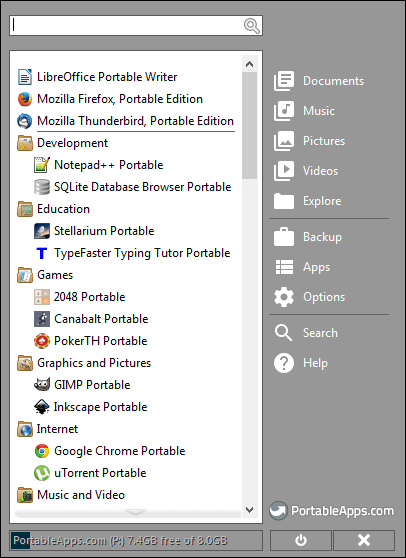
PortableApps.com is an open-source platform that lets you carry fully functional versions of popular software—everything from web browsers and office suites to image editors and backup tools—on a portable drive. Each program is “portable,” which means it can run directly from your USB stick, external hard drive, or even your cloud folder, without installation or admin rights.
Imagine inserting your USB stick into any computer—Windows at school, a shared PC at work, or a friend’s laptop—and instantly accessing your personal software suite with your preferred settings intact. That’s the power of PortableApps.
Why Photographers Love PortableApps
Photographers discovered the magic of PortableApps early. On assignment, they could plug their USB stick into any computer, launch their portable photo editor, and start working immediately—no setup, no license transfer, no worries about leaving files behind. Portable tools like GIMP Portable, IrfanView Portable, or RawTherapee Portable became staples for editing, converting, and organizing photos away from a home workstation.
But what started as a godsend for photographers has now become indispensable for everyone.
Why Everyone Should Use PortableApps
1. Ultimate Portability
No matter where you are, your digital workspace comes with you. Students can keep research notes, citation managers, and office tools on one drive. Business users can load encryption apps, email clients, or schedule managers. Gamers can even store portable emulators or utilities.
All you need is a computer with a USB port—and your digital toolkit travels in your pocket.
2. No Installation Hassles
PortableApps software doesn’t need to be installed. This makes it ideal for public or restricted computers where you don’t have admin rights. Perfect for travelers using hotel computers, university labs, or shared office PCs.
3. Privacy and Security
When you remove your USB stick, you take everything with you—data, settings, and browsing history. Nothing stays behind. PortableApps even supports encryption, so your data remains safe if your drive is lost or stolen.
4. Customizable Software Suite
The PortableApps Platform includes a powerful app store with hundreds of programs in categories like productivity, graphics, security, and utilities. You can install lightweight tools like LibreOffice Portable, Firefox Portable, or VLC Media Player Portable with one click.
Your setup can be fully personalized: themes, layouts, and automatic updates included.
5. Cross-Device Continuity
Your USB stick is the bridge between workstations. Save a document in LibreOffice Portable at home, edit it on another PC at work, and review it later on a laptop abroad—all with the same software and interface. No cloud access? No problem—everything’s right on your drive.
6. Environmentally and Digitally Sustainable
Instead of installing and uninstalling programs across multiple computers (which clutters systems and wastes time), PortableApps lets you use the same clean version everywhere. It’s a lightweight, eco-friendly way to manage digital tools without duplication.
7. Offline Accessibility
Unlike cloud-based tools, PortableApps works completely offline. This makes it ideal for fieldwork, travel locations without reliable internet, or simply maintaining productivity when Wi-Fi goes down.
Real-Life Use Cases Beyond Photography
-
Freelancers: Carry billing software, time trackers, and communication apps between clients.
-
IT Technicians: Use diagnostic or antivirus tools without leaving logs behind.
-
Students: Bring portable versions of Word processors, research software, or citation tools to campus computers.
-
Writers: Keep distraction-free writing tools like FocusWriter or Notepad++ at hand anywhere.
-
Travelers: Store secure browsers, VPN tools, and language apps for global mobility.
Quick Setup Guide
-
Download the PortableApps Platform from PortableApps.com.
-
Select your USB stick as the installation location.
-
Browse and install the apps you need from the built-in app store.
-
Plug in your USB to any computer and launch your PortableApps menu—your toolkit is ready.
Within minutes, your USB drive transforms into a fully functional, secure, and customizable portable computer companion.
Final Thoughts
PortableApps.com isn’t just for photographers—it’s for anyone who values freedom, consistency, and privacy in their digital work. In a world filled with cloud dependencies and device restrictions, PortableApps gives you back control, putting your favorite tools and data on a secure USB stick that works everywhere.